

Reading a run
The Run tab shows what happened when this project last ran, read from the run directory on disk
— the same results.json that report.html is rendered from. It is not a live console and it does
not re-run anything by being looked at.
The headline
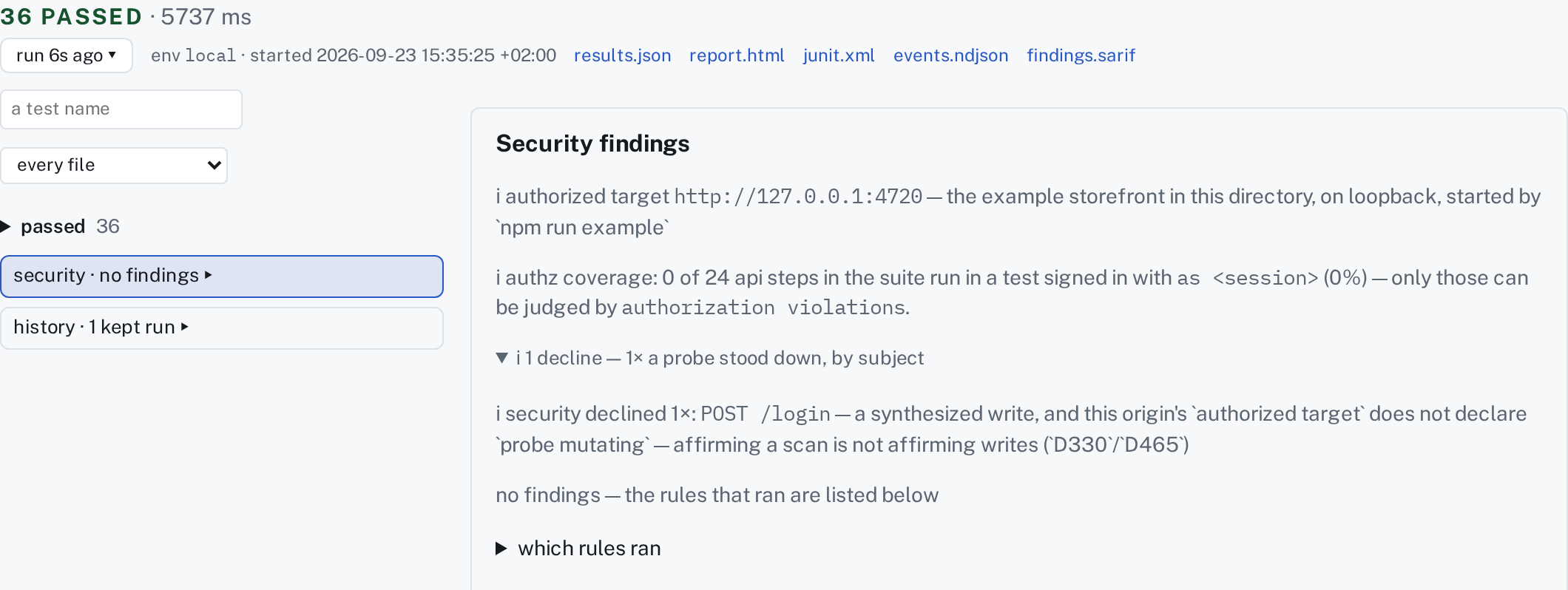
Section titled “The headline”The line at the top carries one verdict — 1 FAILED · 16 passed · 3.1 s, or 17 PASSED, or
INCONCLUSIVE, or CANCELLED — and every other group as a count. A count of zero is not drawn.
Under it: which run this is (run 5 min ago ▾, which opens the list of kept runs), its env and when
it started, the run to compare it with, and the files the run wrote (report.html, junit.xml,
findings.sarif).
A cancelled run says so in the verdict's place, because what it kept is only what it had judged by
then. A run whose load generator saturated says INCONCLUSIVE: its workload numbers describe tflw's
own process more than the system under test, whichever way the thresholds came out.
The tree
Section titled “The tree”On the left, the run's tests grouped by verdict: failed first and open, then inconclusive, skipped, and passed — folded, one row with a count. A run with one failure is read by looking at the top of the pane. The page opens on the first failure, with its failing step open — and the request or page it judged — while the steps that passed stay folded. A run that passed opens on nothing: its headline is the answer.
Picking a test draws it on the right: every step it ran, in order; a failed step names what was expected and what arrived, in the same words the terminal uses. open in Compose takes you to that test's line in its file; rerun this test runs just it again. A search box and a file picker narrow the tree, and the tree says when it is showing a part — and opens every group that holds a match, so a name searched for in a passed run is on screen rather than inside a fold.
Two more rows sit under the tests:
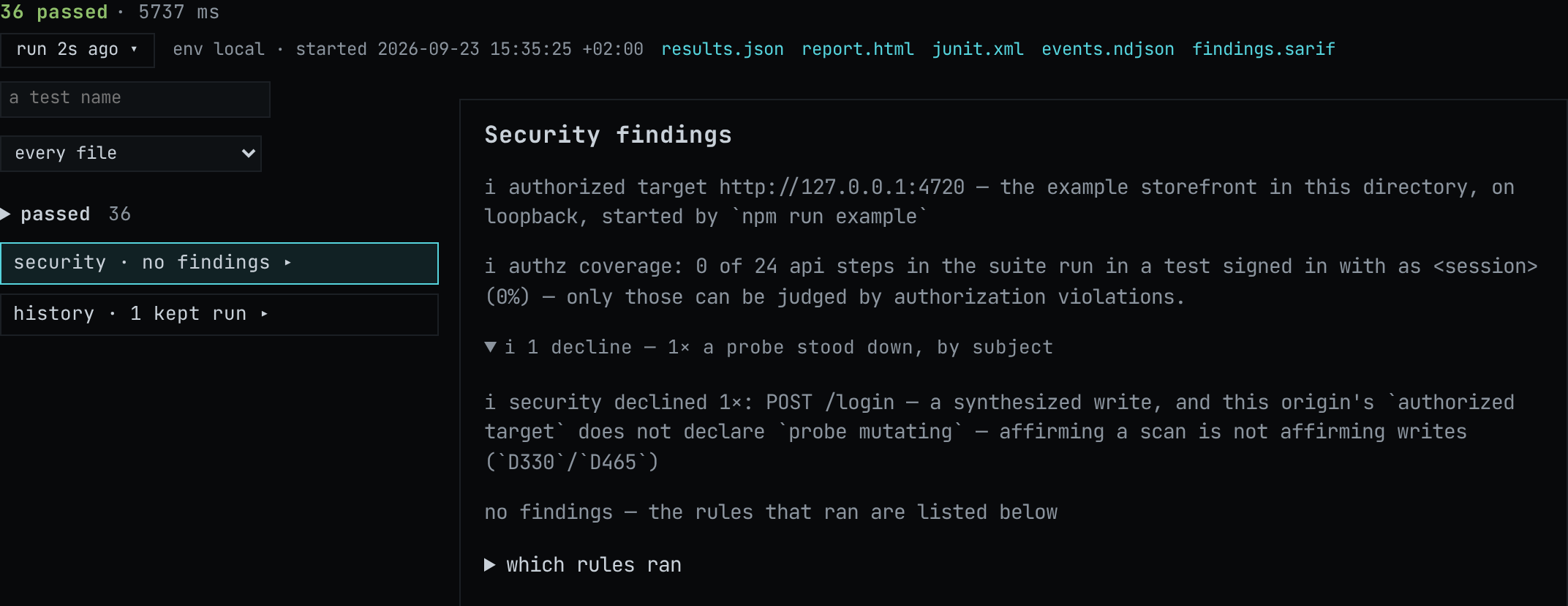
- security — what the run judged by a security rule, and what it declined to judge. The run
in the picture passed and still reports two things a green verdict would otherwise hide: that none
of its api steps sits in a test declaring an owner, so
authorization violationshad nothing to grade; and that a probe was stood down, because a synthesizedPOST /loginis a write and this origin'sauthorized targetdoes not declareprobe mutating. Neither is a failure. Both are the difference between nothing was found and nothing was looked for. The row is there only when the run has something to say about security. - history — each test across the kept runs, oldest on the left, the ones that failed first. A test whose verdict changed while its file did not is marked flaky across runs.
For browser tests, a run can keep a Playwright trace. open trace serves it to Playwright's own
viewer in this tab, from the playwright-core the project already resolves — nothing to install,
nothing spawned. Where a project has no playwright-core, the page gives you the command that opens
the archive yourself.
Running from the page
Section titled “Running from the page”▶ in the header runs what the explorer shows; ▶ beside a test in Compose runs that test. It is the same command a terminal would run, with the same environment: the server's, not your shell's.
A run draws itself where you are. In Compose, a line under the file's name says running · step 3 of 7 · 1.2 s · cancel; each step's mark lands on its row as the step is judged; and the column on the
right follows the run — the response of the request it has reached, or the page a browser step left —
and stays on the failing step when one fails. Pick any row to take the column back. The Run tab
draws the same run as a tree with a running group at the top.
What comes back is a real run — it writes a real run directory, and the next reader of that project sees it. Cancel stops it gracefully: what ran is kept, and the steps it never reached stay not run rather than showing an older run's marks.
Comparing two runs
Section titled “Comparing two runs”Where a project has more than one run directory, one can be read against another. Each step of the picked test shows the compared run's same step one line under it; a workload's tables and charts carry both runs, with the difference called out; and the security row lists the findings the other run had that this one does not. This is how a threshold that has started drifting becomes visible before it breaches.
The control is not in the picture above, and its absence is the rule working. The example has run once, so there is nothing to compare against and the page offers no chooser rather than an empty one. Run the suite a second time and the chooser appears in the headline.
For load tests specifically, the planned and achieved rates are drawn on one plot, so a workload that did not reach its target is a picture rather than an inference.
What a verdict is not
Section titled “What a verdict is not”A green run says every assertion that ran passed. It does not say the test asserted anything worth asserting, and the page does not pretend otherwise — a test with no assertions runs, passes and is shown passing. Reading the Compose tab beside the Run tab is how you tell the difference, which is most of why they are tabs over one file rather than two screens.