

The spine
Every surface is the same three things in the same places: the header across the top, the files down the left with the kinds at their head, and the tab strip over whichever file you picked. Learn it once and nothing else on the page needs learning.
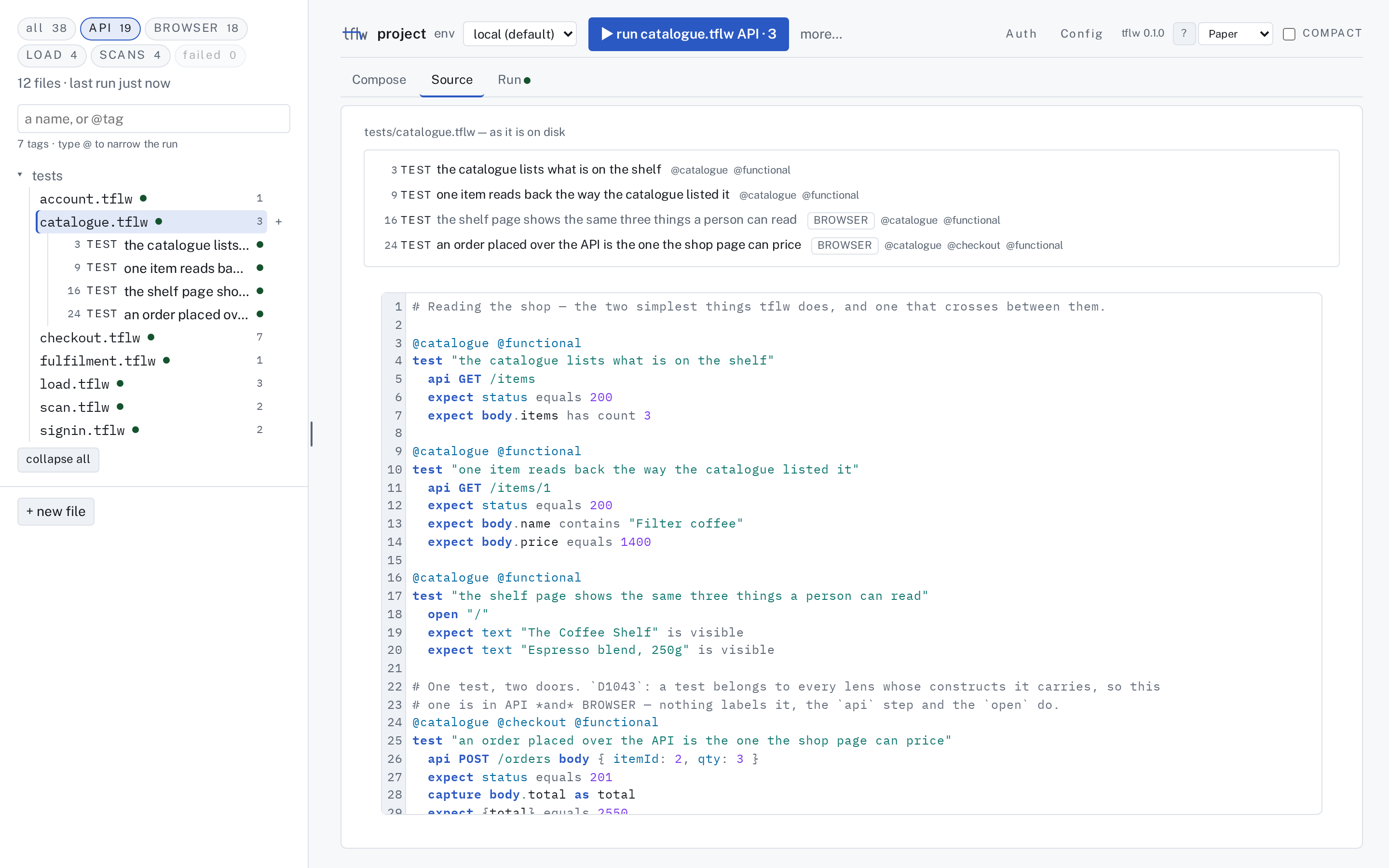
The header
Section titled “The header”One row: the project's name, the env a run reads, ▶ run, and more… — then, on the right,
Auth, Config, which tflw this is, ?, the theme and compact.
▶ runs exactly what the file list shows. Its label is the command read back, with how many tests
that is: ▶ run all · 38, ▶ run API · 19, ▶ run checkout.tflw · 7, ▶ run @smoke · 5. The
chip, the failed chip, a search or an @tag in the search box, and any files you selected all
narrow it, and nothing else does — so the button never runs something the list is not showing you. more… holds the rest of
what tflw run takes, and only the flags this run can spend: workers when a load test is in it,
headed when a page is.
Auth and Config are project facts, not stages of a file, so they are words on the header rather
than tabs. Each opens a panel over the pane — Config is the editor over tflw.config, Auth is who
this file's tests run as and what they may reach — closed by its ✕ or Esc, and each has its own
address (#/config, #/auth), so a link still names it.
The file list
Section titled “The file list”At its head, the four kinds as chips, with all in front, each carrying its count. A
chip is the count and the filter: with API on, the list holds the files that have an API
test — plus the file you have open, whatever it holds, so the pane is never about a file you cannot
find — and each file's number counts its API tests. Under all, every .tflw file the project holds
is listed with everything it declares. A file that declares nothing reads —, which is not a zero:
it is a fragment other files resolve against. A file that does not parse is listed with its
diagnostics and counted nowhere — an unparsed file has no honest number to contribute — and the line
under the chips says how many were left out.
Under the search box, the tag count tells you how much narrowing the project supports before you try it. Picking a file changes what the tabs show. It never changes the chip, and changing the chip never moves you off the file.
Every test carries a dot: green passed, red failed, hollow for skipped or not run yet — its
newest verdict in the runs the project has kept, so a run of one file does not grey out the rest. A
file's dot rolls its tests up (red if any failed) and its tip counts them. The line under the chips
says how old the dots are and how many are red: 12 files · last run 2 h ago · 1 failed.
failed, beside the kinds, narrows the list to the tests that are failing, and every file it keeps
opens onto the failing tests that put it there — so the list answers what failed without opening
Run. It combines with a kind chip, and ▶ under it runs those tests and nothing else: it is
tflw run --failed, which replays exactly the tests whose last kept run failed. A test stays red
until a run passes it.
The open file lists its tests, hooks and crawls; a request is not a row here — it is a step, and
Compose lists the steps. + beside a file or a test (on hover, or when the row has focus) and the
row's right-click menu both add a test to that file or a request to that test. + new file stays
pinned to the foot of the list however long it grows.
The chips live in the address bar (#/compose/checkout.tflw?kind=api&failed=1), so a narrowing is
shareable and survives a reload. A link from before chips existed — #/api/compose/checkout.tflw — still opens the
same file, with the API chip on.
The three stages
Section titled “The three stages”A tab is a stage of one file's life. It never changes which file you are looking at.
| tab | what it shows |
|---|---|
| Compose | the test's steps — the one you picked is edited in place — and what the last run got back for it |
| Source | the file itself — and, while you are composing, the bytes the write will produce |
| Run | what happened when this project last ran — the tab's dot is that run's verdict |
There is deliberately no History, no Docs and no Coverage tab. None of those is a stage of a file's life, so none of them is a tab.
Themes
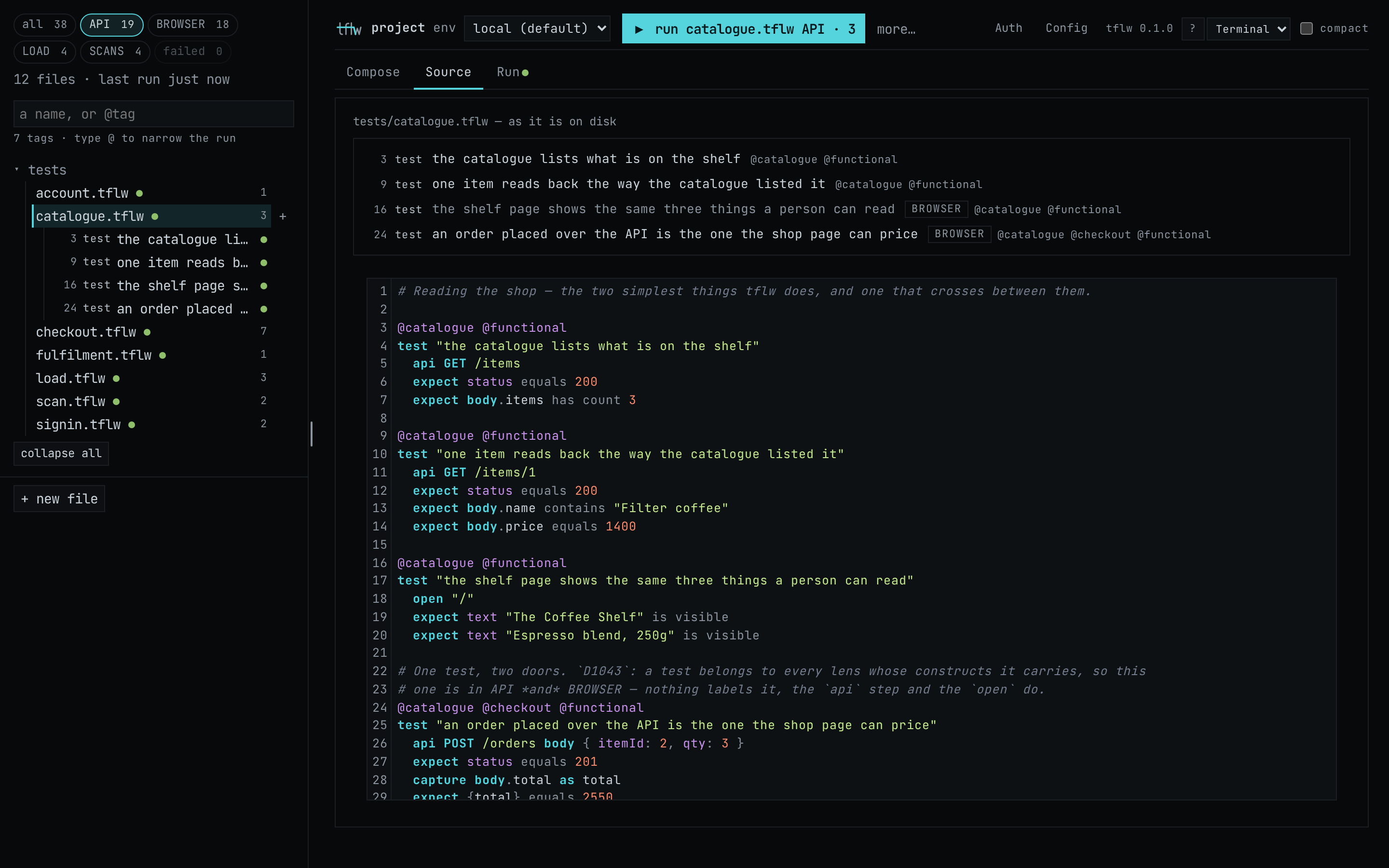
Section titled “Themes”The header's picker offers two themes: Paper, the light one the page opens in, and Terminal, the dark one. They differ in type and shape as well as colour. The pictures throughout this section are both of them, and which you see follows this site's own appearance setting.
Beside the picker, compact tightens the spacing and sets smaller titles, on either theme. Use it when you want more rows of a long file on one screen.
Both choices are remembered in your browser and nowhere else. They are not written to the project, so they cannot show up in a diff.