

API tests
#/?kind=api— call an endpoint, assert what comes back, chain one call into the next.
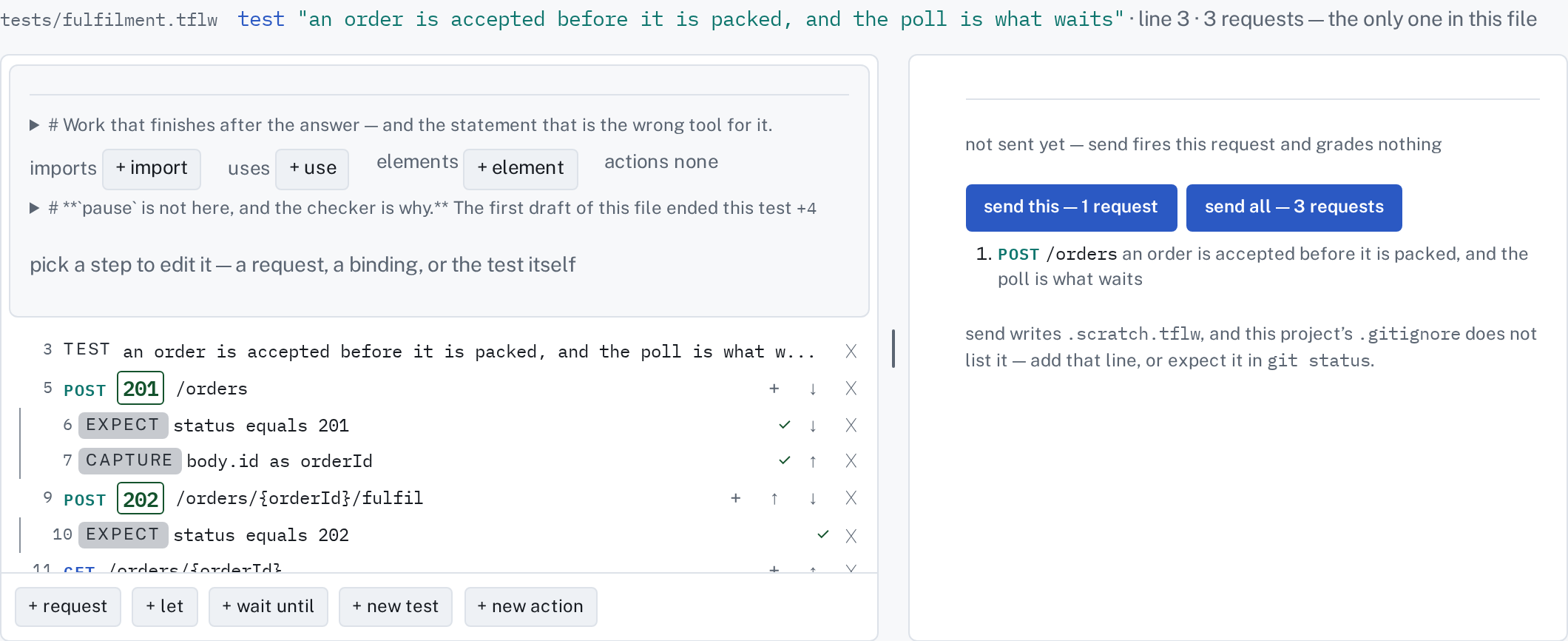
The kind of test tflw started as, and the one the Compose pane was built for. On the left are the test's steps: each request, and the assertions under it that read what came back. On the right is what came back.
Picking a row edits it where it is
Section titled “Picking a row edits it where it is”Every step is one row. Click a row, or reach it with the keyboard and press Enter, and it becomes its own editor in place. Esc closes it, one level up.
- A request becomes a method and a path on its row, with headers, body and more (a
second service, a label, a timeout, redirects,
retry after) folded under it. Each fold says how many it holds, and nothing is open until you ask. - An assertion becomes subject · matcher · value on its own line, with its last verdict at the
end. Six assertions stay six lines. The rare forms (
check,any/all,not) are behind⋯, and a row already using one shows it open. - The test itself opens a card under its row: the name, tags, retries, a
with eachtable and a workload. These are clauses rather than lines, so they get a card rather than a row.
Nothing is written until write (or ⌘S). Until then every change is in the draft the Source tab shows.
What came back
Section titled “What came back”The right-hand column opens on the last run. Pick a request and it shows what that run recorded
for it: the status, the headers and the body, under a line that says how old it is. If you have
changed the request's words since, the line says ⚠ this step changed since · send to refresh, so
old evidence is never mistaken for an answer to the new question. If the run kept only headers
(evidence headers-only), the column says so rather than showing an empty body.
Tick a value in the body to write an assertion about it, or to capture it for a later request.
Either lands under the request it came from and opens there.
Below 1100 px wide the column folds under the picked row instead of standing beside the steps.
What + new test writes here
Section titled “What + new test writes here”A request and one assertion:
test "creates an order and reads its total back" api POST /orders body { itemId: 1, qty: 2 } expect status equals 200The assertion is not a preference and is not optional. An api step with nothing reading it
can never fail, so a guided start that produced one would be teaching the shape the checker warns
about. expect status equals 200 is the assertion 1,112 of the two corpora's requests already
carry, which is why it is the one the button writes.
What the pane offers
Section titled “What the pane offers”Three + gestures at the foot of the steps — + request, + let and + wait until —
and one control only a file with a request has: Send, at the top of the right-hand column.
Send issues this request and the ones above it that feed it, because 734 of the sibling corpus's
1,031 requests read a binding an earlier call captured. It shows you what came back. Nothing is
graded and nothing is kept — that is tflw run's job, and the Run tab's.
+ wait until is the one worth knowing about early: wait until api … re-issues a request until
the assertions under it pass, instead of sleeping for a guessed number of seconds and hoping.
What it will not edit
Section titled “What it will not edit”A header or csrf line. Not an omission and not a missing builder — both are dispatched by the
parser from a session block in tflw.config only, and the printer has no case for either, so
there is no file this pane edits that could hold one. Sessions live in tflw.config and are edited
in the Config panel; Auth shows which one a test runs as.
Next: Assertions in depth teaches the language this pane writes.